
Stop Buffering File Uploads. Here's What Streaming Actually Does to Your Memory.
Most file upload code loads the entire file into RAM twice, once in the browser, once on the server. For small files nobody notices. For large files, your server dies silently. Here's the full picture from browser stream to S3.
The Problem Nobody Talks About
Every file upload tutorial shows you the same thing. Create a FormData object, append the file, send it with Axios or fetch. Done. It works. Ship it.
What nobody shows you is what happens in memory when that file is 500MB.
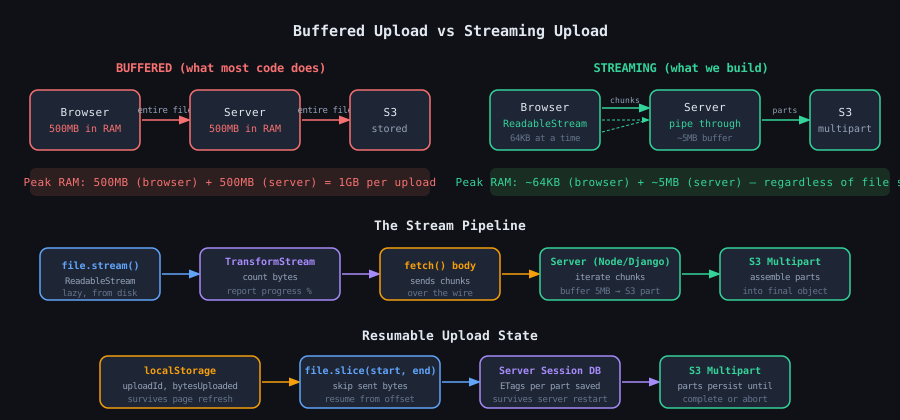
The browser reads the entire file into a JavaScript ArrayBuffer before sending a single byte. Your Node.js or Django server receives it and holds the entire body in memory while waiting for the upload to finish. Then it uploads to S3 from that in-memory buffer.
That is the file sitting in RAM twice simultaneously. At 500MB, that is 1GB of memory consumed by a single upload request. At 10 concurrent uploads, your server is gone.
The fix is not a library or a configuration flag. It is understanding how data actually moves through a system and using the primitives the platform already gives you.
What the Browser Actually Does With Your File
When you pass a File object to FormData and send it with Axios, the browser
calls .arrayBuffer() internally. That reads the entire file from disk into
a JavaScript ArrayBuffer sitting in heap memory. For a 200MB PDF, that is
200MB consumed before the first byte leaves the machine.
The alternative the browser has always had is file.stream(). This returns a
ReadableStream backed by the file on disk. Data is read in chunks, typically
64KB at a time, only when something downstream is asking for it. Nothing sits
in memory waiting.
The Web Streams API gives you three primitives:
ReadableStream is a source. It produces data lazily when pulled. A file, a network response body, or anything you generate yourself can back one.
WritableStream is a destination. Chunks flow into it and get consumed. An S3 upload, a file write, or a DOM element can be a Writable.
TransformStream sits between the two. It has a writable side where data enters and a readable side where transformed data exits. The transform function in between can count bytes, compress, encrypt, or simply pass data through unchanged.
To track upload progress without buffering, you connect them:
const progressTransform = new TransformStream({
  transform(chunk, controller) {
    bytesUploaded += chunk.byteLength;
    onProgress(bytesUploaded / file.size);
    controller.enqueue(chunk); // pass through unchanged
  }
});

const trackedStream = file.stream().pipeThrough(progressTransform);

await fetch('/upload', {
  method: 'POST',
  body: trackedStream,
  duplex: 'half',
});
pipeThrough connects the file stream to the transform and returns the
transform's output side as a new ReadableStream. fetch pulls from it chunk
by chunk as the network absorbs data. At no point does your JavaScript hold
the full file.
The duplex: 'half' option tells the fetch spec you are streaming a request
body. Without it, some environments buffer the entire body before sending.
Resumable Uploads: What Happens When the Connection Dies
The streaming approach above is memory-efficient but not resilient. If the
browser tab closes at 400MB into a 500MB upload, the fetch aborts, the server
closes its connection to S3, and abort_multipart_upload runs. Everything
uploaded so far is discarded. The user starts over.
Making uploads resumable requires three things working together.
First, a stable upload identity that survives page refresh. localStorage is the
right tool here. Before sending the first byte, your client generates or
receives an uploadId and stores it alongside bytesUploaded and the file's
name and size.
Second, chunk-based sending instead of one continuous stream. Rather than
streaming the file as one request, you slice it into 5MB pieces and send each
as a separate POST. After each successful chunk, you update bytesUploaded in
localStorage. If the page refreshes, you know exactly where to continue.
const existing = localStorage.getItem(`upload_${file.name}`);
const startByte = existing ? JSON.parse(existing).bytesUploaded : 0;

for (let offset = startByte; offset < file.size; offset += CHUNK_SIZE) {
  const chunk = file.slice(offset, offset + CHUNK_SIZE);
  await uploadChunk(chunk, partNumber);

  localStorage.setItem(`upload_${file.name}`, JSON.stringify({
    bytesUploaded: offset + chunk.size,
    uploadId,
    s3UploadId,
  }));
}
file.slice() is the critical primitive. It creates a Blob representing bytes
from offset to offset plus chunk size without reading the skipped portion from
disk. The browser goes directly to that byte position. A resume at 400MB does
not re-read the first 400MB at all.
Third, the server must persist the S3 ETag for each completed part. When the
client resumes and sends chunk 81 through chunk 100, the server needs ETags
from chunks 1 through 80 to call complete_multipart_upload correctly. Those
ETags live in a database row keyed by uploadId, not in memory that disappears
when the server restarts.
The complete call only happens after the client explicitly tells the server all chunks are done. The server then sorts the parts by part number, passes the full ETag list to S3, and S3 assembles the file.
The Tradeoffs Nobody Mentions
Streaming uploads solve a real problem but they introduce real complexity. Understanding both sides is what separates knowing a technique from knowing when to use it.
Validation becomes harder. With a buffered upload you can read the full file, check its magic bytes, run a virus scan, validate the PDF structure, and reject it before it ever reaches S3. With streaming you are forwarding bytes to S3 before you have seen the whole file. Post-upload validation with S3 event triggers is possible but the file is already stored when you reject it.
Metadata separation is awkward. FormData lets you send fields and a file in one clean request. With a raw stream as the request body, metadata has to go somewhere else: custom headers, a preceding init request, or query parameters. None of these feel as natural.
The 5MB S3 minimum adds server-side buffering that partially defeats the memory saving. You are not holding the full file but you are holding 5MB at a time. For very high concurrency this is still significant.
Browser support for streaming request bodies with duplex: half is not
universal. Safari support arrived later than Chrome and Firefox. If your users
are on older browsers, the fetch will fall back to buffering or fail entirely.
For files under 10MB, the buffered approach is almost certainly fine. The complexity of streaming is not justified by the memory saving at that size. The crossover point in practice is somewhere around 50MB where server memory pressure and timeout risks start to become real operational concerns.
The resumable pattern is worth having for any upload that takes more than a few seconds on a typical connection. Losing 8 minutes of upload because of a brief network hiccup is a bad user experience regardless of file size. The localStorage checkpointing adds maybe 20 lines of code for something users will notice when it saves them.
What Actually Flows Through the Wire
The HTTP header that makes all of this work at the protocol level is
Transfer-Encoding: chunked. When the browser sends a ReadableStream as a
fetch body without a known Content-Length, it frames the data in chunks on
the wire. Each chunk is preceded by its size in hexadecimal, followed by the
data, followed by a carriage return line feed. A zero-length chunk signals the
end.
Your server receives these chunk frames and decodes them before your application code sees the data. This is done by the HTTP layer transparently. What your request handler iterates is the decoded body, not the raw frames.
Where this causes real production bugs is in proxies. If a proxy receives a
chunked upload, decodes it internally, and then forwards the request to an
upstream service while still including the Transfer-Encoding: chunked header,
the upstream tries to decode the already-decoded body as if it were still
chunked. What was valid JSON becomes an invalid chunk size header. The upstream
returns a 400 and nobody immediately understands why because the bug only
appears under specific upload conditions.
Any proxy in front of your upload endpoint must strip Transfer-Encoding from
forwarded requests and either set an accurate Content-Length if it buffered
the body, or let Node's HTTP layer re-add Transfer-Encoding naturally if it
is piping through.
The same applies to nginx. If you have nginx in front of your service with
proxy_request_buffering on, nginx buffers the entire upload before forwarding
it, which defeats streaming entirely. Setting proxy_request_buffering off
tells nginx to forward chunks as they arrive, which is what you want for large
uploads.
Subscribe to Updates
Get notified about new projects and articles.
Comments
Loading comments...